
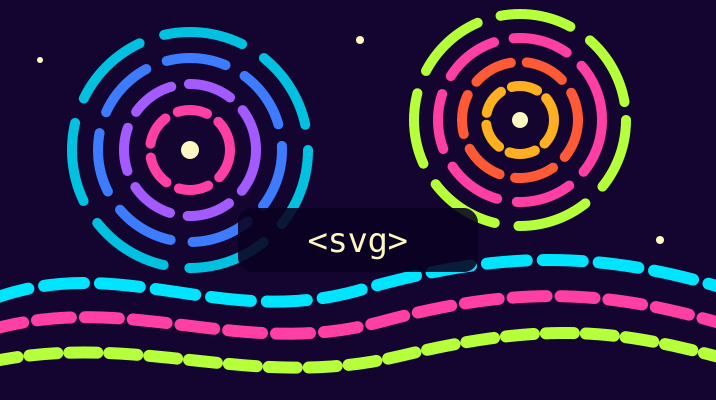
Animated SVG covers and diagrams for your tutorials
An SVG file is plain text, so one small file can be a tutorial cover, a diagram or an animation. Jambotron accepts SVG as a tutorial cover and keeps its animations. Scripts and links to other sites are removed on upload.
What works in a cover
The cover is shown with <img>, so the browser draws the SVG as a picture:
| Works | Does not work |
|---|---|
CSS animations: <style> with @keyframes |
JavaScript: <script>, onclick, onload |
SMIL: <animate>, <animateTransform> |
Links, images and fonts from other sites |
Gradients, masks, filters (hue-rotate, blur) |
<foreignObject> with HTML inside |
PNG or JPEG embedded as data:image/...;base64 |
Web fonts: use system fonts or convert text to paths |
Covers are shown at 716 × 400. Use this viewBox, and nothing gets cropped.
A minimal animated cover
<svg xmlns="http://www.w3.org/2000/svg" width="716" height="400" viewBox="0 0 716 400">
  <style>
    @media (prefers-reduced-motion: no-preference) {
      .ring { transform-box: fill-box; transform-origin: center; animation: spin 12s linear infinite; }
      .star { animation: blink 2s ease-in-out infinite; }
    }
    @keyframes spin { to { transform: rotate(360deg); } }
    @keyframes blink { 50% { opacity: .3; } }
  </style>
  <rect width="716" height="400" fill="#140430"/>
  <circle class="ring" cx="358" cy="200" r="120" fill="none"
          stroke="#FF3FA4" stroke-width="12" stroke-dasharray="60 20"/>
  <circle class="star" cx="358" cy="200" r="14" fill="#FFF7C2"/>
</svg>
prefers-reduced-motion stops the animation for readers who turned motion off in their system settings.
Diagrams
Draw a diagram in Inkscape, Figma, draw.io or Excalidraw and export it as SVG. Before you upload it:
- turn text into paths, or use a common font (Arial, DejaVu Sans): an SVG image cannot load web fonts;
- remove embedded links to other sites;
- keep the file under 3 MB.
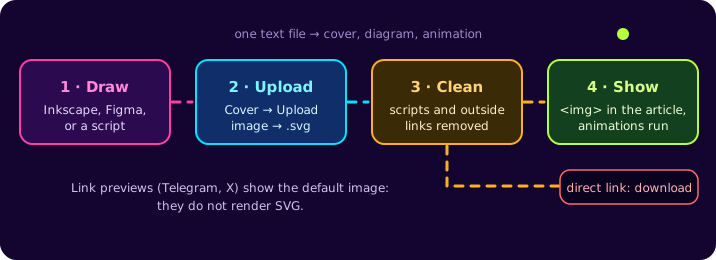
The diagram at the top of this article is a 2.6 KB SVG: four boxes, arrows with stroke-dasharray and one animation that moves the dashes.
Painterly covers from code
The cover of dependency failed to start: container is unhealthy is made of about 1,200 short curves. Each one follows a vector field with three swirls, and its colour comes from its direction. A script writes the SVG:
const swirls = [{ x: 320, y: 122, spin: 1, size: 90 }, { x: 500, y: 86, spin: -1, size: 58 }];

function direction(x, y) {            // where the paint flows at (x, y)
  let dx = 1, dy = 0;
  for (const s of swirls) {
    const rx = x - s.x, ry = y - s.y, r = Math.hypot(rx, ry) + 1;
    const pull = s.spin * 3 * Math.exp(-r / s.size);
    dx += -ry / r * pull;
    dy += rx / r * pull;
  }
  const len = Math.hypot(dx, dy);
  return [dx / len, dy / len];
}

let paths = '';
for (let y = 0; y < 280; y += 14) for (let x = 0; x < 716; x += 22) {
  const [ux, uy] = direction(x, y);
  const hue = Math.round(Math.atan2(uy, ux) * 180 / Math.PI * 1.6 + x * 0.3);
  paths += `<path d="M${x} ${y}q${ux * 11 | 0} ${uy * 11 | 0} ${ux * 22 | 0} ${uy * 22 | 0}"
    stroke="hsl(${hue} 95% 55%)" stroke-width="10" stroke-linecap="round" fill="none"/>`;
}
Wrap paths in <svg> and add @keyframes with filter: hue-rotate(360deg), and the whole sky shifts through the colour wheel. Round coordinates to whole numbers and group strokes by colour to keep the file small: the cover is 27 KB.
Upload it
- Open your tutorial for editing.
- In Title image, press Upload image, choose the
.svgfile and upload it. - Press Use image, then Save.
If the file has a <script> or onclick, Jambotron saves it without them. If its CSS loads something from another site (@import, url(https://…)), the upload stops with an error that says so.
Link previews in Telegram, X and Facebook do not render SVG, so a tutorial with an SVG cover shows the default Jambotron image there.